Multimedia Files Symbols Set: Visual Tools for Media Projects
What Is the Multimedia Files Symbols Set?
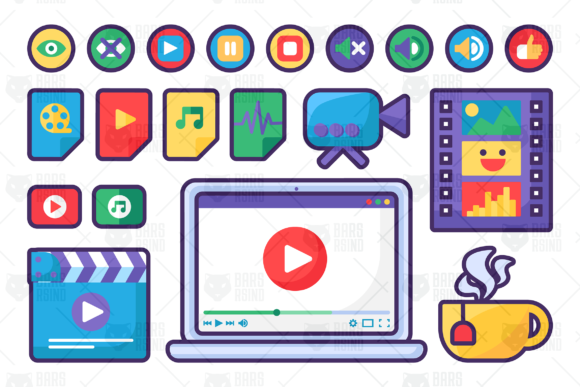
The Multimedia Files Symbols Set is a collection of 20 vector graphic cliparts designed to support a wide variety of media-related visual projects. These symbols include icons like play, pause, stop, sound, and mute buttons, as well as representations of video files, audio files, filmstrips, and more. With elements such as a clapperboard, laptop with online video, and even a cup of coffee, this set offers versatile graphics ideal for stickers, animations, design templates, web interfaces, and print media.
All symbols are created as vector graphics, meaning they scale without losing quality, and are delivered in a single AI CS6 file with editable strokes. This format allows for customization, making the set suitable for both personal and commercial use depending on the project’s needs.
Why Different People Value These Symbols
Whether you're a beginner exploring digital design or a professional motion designer working on a client project, the Multimedia Files Symbols Set can serve different needs. Its flexibility makes it appealing to a broad audience:
- Beginners find it easy to integrate ready-made icons into their first designs without needing advanced illustration skills.
- Content creators use the symbols to enhance blog posts, tutorials, or social media graphics related to media production.
- Educators may incorporate the graphics into presentations or learning materials to visually explain media tools and concepts.
- Entrepreneurs and marketers benefit from using these visuals in promotional materials, app interfaces, or product packaging related to digital media.
- Freelancers and designers appreciate the scalability and editability of vector files for adapting to different client projects.
Beginners: Quick Visual Support for Learning and Projects
If you're just starting out in graphic design or digital content creation, the Multimedia Files Symbols Set offers a straightforward way to add professional-looking visuals to your work. You can drag and drop icons like a play button or a sound icon into a presentation or blog post without worrying about pixelation or needing to draw them from scratch.
For example, a beginner creating a YouTube tutorial on video editing might use the laptop with online video symbol to visually represent streaming platforms or the clapperboard sticker to introduce a filmmaking segment.
Experienced Designers: Customization and Integration
Professionals who work with Adobe Illustrator (CS6 or compatible versions) can take full advantage of the editable stroke feature. This allows for fine-tuning line weights, colors, and styles to match a specific brand or design system. The vector format ensures that the graphics remain sharp at any size—ideal for both web and print use.
A motion designer creating an explainer video about media file types might animate the cinema file, music file, and video camera clipart to illustrate different formats. The ability to edit stroke makes it easier to align the graphics with the overall visual style of the project.
Educators: Visual Aids for Teaching Media Concepts
In a classroom or online course, explaining abstract media concepts becomes easier with visual symbols. A teacher introducing students to video editing software might use the video camera clip art alongside the laptop and video editing program tools graphic to explain the workflow from capture to editing.
These symbols also help in teaching about file types and media restrictions. For instance, the open eye and closed eye icons can represent content visibility or access permissions, making digital literacy topics more engaging and understandable.
Small Business Owners and Marketers: Branding and Promotion
Businesses that offer digital services—like video editing, podcast production, or streaming platforms—can use these symbols in marketing materials. The icons can be incorporated into infographics, landing pages, or product feature lists to visually communicate capabilities and offerings.
A local film production company might use the cinema file and clapperboard sticker in a brochure or website banner to signal their expertise in film creation. Meanwhile, a podcast hosting platform could use the audio file and sound icon to highlight their support for various audio formats.
Consumers and Hobbyists: Personal Projects and Creative Expression
Even outside of professional settings, the Multimedia Files Symbols Set can be used for personal creativity. Hobbyists who create digital art, scrapbooks, or DIY projects can use the graphics to add a media-themed touch to their work.
For example, a home movie enthusiast might use the filmstrip with different scenes graphic to design a poster for a personal short film festival. Or someone designing a coffee-themed blog layout could use the cup with hot coffee or tea graphic alongside the laptop and online video symbol to represent content creation during a relaxing break.
Key Considerations When Evaluating the Set
When deciding whether the Multimedia Files Symbols Set is right for your project, consider the following factors:
- File Compatibility: The set is provided as an AI CS6 file, so users need Adobe Illustrator or compatible software to fully edit the stroke features.
- Scalability: Since all graphics are vector-based, they scale cleanly to any size, making them ideal for both digital and print use.
- Commercial Use: Always check licensing terms before using the graphics in commercial projects.
- Customization Needs: If you require detailed edits to line weights or colors, the editable stroke feature will be especially valuable.
- Design Consistency: The set uses a unified visual style, which helps maintain consistency across your design or presentation.
Real-World Examples Across Use Cases
- Bloggers: Use the video file and music file icons to categorize media types in a post about digital content creation tools.
- UI/UX Designers: Incorporate the play, pause, and stop icons into media player interfaces for apps or websites.
- Students: Use the track symbol and clapperboard sticker in a school presentation about filmmaking techniques.
- Freelancers: Build a portfolio layout using the laptop and video editing program tools graphic to showcase media-related projects.
- Event Planners: Design promotional materials for film festivals or music nights using the cinema file and audio file icons.
Is the Multimedia Files Symbols Set Right for You?
If your work or hobby involves digital media, video editing, education, or visual storytelling, this set offers a practical collection of graphics that can save time and enhance your visual communication. Whether you're looking for a simple icon to label a media file or a customizable vector graphic for a detailed project, the Multimedia Files Symbols Set provides a flexible and scalable solution.
Before downloading, ensure you have the right software to work with AI CS6 files and that the licensing aligns with your intended use. Once integrated, these symbols can help you communicate ideas more clearly, enrich your designs, and streamline your creative workflow.